Police Radar - Camera Detector
M.I.R.Auto & Vehicles
4.4530.00 Reviews
- Version
- 3.86
- Installs
- 1.00M
- Age Rating
- Teen
Screenshots
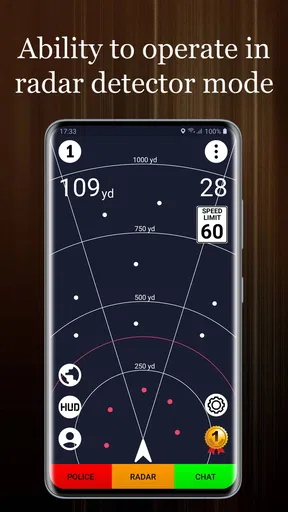
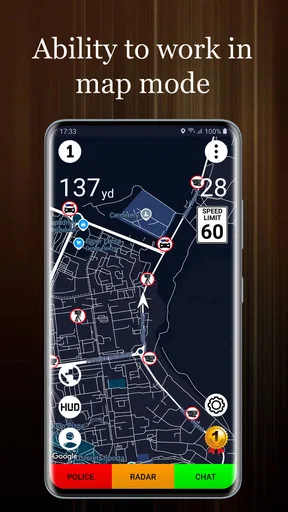
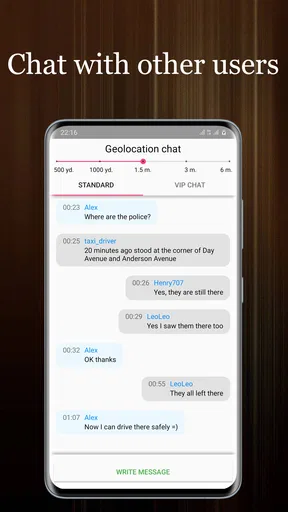
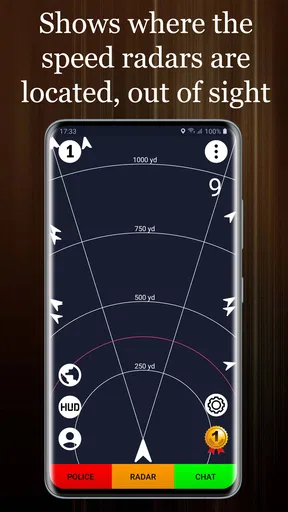
Our Review of Police Radar - Camera Detector
 Analysis by Appyee
I installed Police Radar - Camera Detector expecting a simple warning tool, and that is exactly where its appeal begins. This free Auto & Vehicles app from M.I.R. is built for drivers who want to stay aware of fixed and portable speed-radar locations without turning every journey into a complicated navigation project. After using it as a companion rather than as my main map, I found that its usefulness depends less on novelty and more on whether I could make it part of a sensible driving routine.
The first impression is straightforward: this is not trying to replace a full navigation service, provide a complete traffic-management system, or make driving decisions for me. Its role is narrower and, in the right situation, useful. It gives attention to radar locations so I can approach familiar roads with more awareness. That focus makes it easier to understand than an overloaded driving app, but it also means I have to use it responsibly and avoid treating an alert as permission to ignore the road, signs, or local rules.
From first-week appeal to lasting road companion
I found that a dedicated radar tool is easiest to keep using when it fits naturally into a routine, rather than demanding attention throughout a drive. This section looks at how its focused purpose can remain useful beyond the first few trips, and what I would weigh before making it a regular part of my setup.
Why the first few drives feel useful
During the first week, the app has an obvious practical advantage: it adds a dedicated layer of awareness to journeys that might otherwise feel routine. A driver who regularly uses the same roads may know where a fixed camera is located, but portable radar locations are less predictable. Having a tool aimed at both kinds of locations can make the drive feel less dependent on memory alone.
I especially liked the idea of using it before setting off, rather than constantly interacting with it while moving. That small change matters. The safest workflow is to prepare the route, mount the phone properly if necessary, and then keep attention on driving. The app works best as background assistance, not as something that invites repeated tapping or screen checking.
Its store presence is strong enough to suggest that many drivers find this focused approach worthwhile: it has a 4.4 average from around 17 thousand ratings and more than a million installs. Those figures do not guarantee that every local road will feel equally well covered, but they do show that the concept has moved beyond a novelty experiment. I can understand why. A dedicated warning tool is easier to justify when a person drives frequently through unfamiliar areas or wants a reminder to check speed before entering known problem zones.
A realistic everyday scenario
Imagine a weekday drive between home and work that crosses several different road types. The first part is familiar, the middle section passes through a town with changing limits, and the final stretch includes a road I rarely use. I would open the app before leaving, review the relevant radar awareness, and then rely on the vehicle’s speed display and road signs while driving. In that situation, the app is valuable because it helps me anticipate where extra care may be needed, while the actual decision remains mine.
That distinction is important. A camera detector should never become an excuse to brake sharply at the last moment, accelerate between warning points, or drive according to an alert instead of the posted limit. The most useful habit is calmer: maintain a legal, consistent speed and treat information from the app as a prompt to pay attention earlier.
What makes it different from ordinary navigation
Typical navigation apps are designed around directions, estimated arrival times, traffic conditions, and destinations. Camera information may be one layer among many, but it is rarely the central reason to open them. Police Radar - Camera Detector takes the opposite approach. Its identity is built around radar awareness, which can be more convenient for someone who already knows the route and does not need turn-by-turn guidance.
That specialization is also its first trade-off. If I need a route, live congestion guidance, lane instructions, fuel stops, or a broad travel overview, a conventional navigation app is the better primary tool. I would use this app alongside that kind of service only when I specifically wanted its radar-focused role. Running several driving apps can increase distraction, battery use, and setup friction, so the combination should be kept simple.
The details that matter after the novelty fades
The novelty of seeing radar information on a screen wears off quickly. What remains is whether the app earns a repeatable place in my routine. For me, the answer depends on three questions: do I drive often enough to benefit, do I travel outside familiar roads, and am I willing to check information before moving instead of fiddling with the phone during the journey?
It is particularly suited to drivers who make regular regional trips, delivery-style journeys, or weekend drives through unfamiliar places. It can also help a cautious driver build a better speed-awareness habit. On the other hand, someone who only drives short, familiar routes and already follows posted limits carefully may not notice enough recurring value to keep opening it.
The app is free to install, with optional in-app purchases ranging from $0.99 to $5.49 per item. That makes trying it relatively easy, but I would still evaluate the free experience before spending anything. The sensible question is not whether an optional purchase unlocks a more attractive setup, but whether the app consistently improves my driving preparation over several weeks.
Month-to-month value comes from routine, not alerts alone
Long-term usefulness comes from repetition. I would get the most from this app by making it part of a pre-drive checklist: confirm the route, check the radar information, set the phone aside, and drive according to signs and conditions. This workflow is more sustainable than opening it only after receiving a warning or using it reactively when I am already close to a camera.
That approach also reduces one of the biggest weaknesses of radar-focused tools: they can encourage a narrow view of safe driving. Cameras are only one part of the road environment. Weather, pedestrians, cyclists, temporary restrictions, roadworks, visibility, and traffic flow may matter more than any fixed location. A mature user treats the app as one source of awareness, not as a complete safety system.
Another useful habit is to judge the app by whether it improves anticipation rather than anxiety. If the warnings make me scan the road earlier and hold a steady legal speed, the tool is doing something positive. If they make me stare at the display, brake suddenly, or become preoccupied with finding every possible location, the balance has gone the wrong way.
Maintenance is the quiet cost
Any location-based road information needs attention over time. Roads change, temporary controls appear, and local conditions can differ from what a database suggests. Even when the app itself is easy to open, I still have to remember that no detector should be treated as perfectly current in every place. That is why I would compare what it indicates with visible signs and my own knowledge of the road.
The current version is 3.86, and the app supports Android 7.0 and later. That broad compatibility is helpful for drivers using older phones, although compatibility alone does not remove the need to keep the app and phone functioning reliably. Before a long trip, I would check that the device has enough charge, that the screen can be seen without unsafe adjustment, and that the app behaves as expected while stationary.
Maintenance also includes deciding when not to use it. If I am driving in a place where phone use is restricted, dealing with difficult weather, or navigating a complicated unfamiliar junction, I would give the road my full attention and leave the app alone. A tool that is supposed to support awareness should never create a new distraction.
Where recurring fatigue appears
The main source of fatigue is not necessarily the interface; it is the mental overhead of interpreting warnings. Repeated alerts can become background noise, especially on roads with many listed locations. Once that happens, I may stop distinguishing important information from routine notifications. A focused app can therefore feel less focused if I rely on every alert equally.
Portable radar information introduces another kind of uncertainty. A driver may expect a warning to correspond exactly to what is encountered, but real-world placement and timing can vary. I would avoid building a driving strategy around a precise alert point. The better response is to remain within the limit throughout the relevant stretch, not to change speed only when the phone signals.
There is also the fatigue of using a second app when a navigation service already handles most of my driving needs. Switching between tools, arranging the phone, and listening for overlapping prompts can make a simple trip more complicated. For occasional users, that setup burden may outweigh the benefit. Someone who wants one polished all-purpose driving application may prefer a navigation alternative with camera awareness already integrated.
Who should use it, and who should skip it
I would recommend giving it a serious trial to frequent drivers who want dedicated radar awareness, especially those who travel beyond their usual routes. It is also a reasonable choice for people who prefer to prepare before driving and want a focused companion rather than another full navigation dashboard. The free entry point makes that trial less demanding, while the Teen content rating is a reminder that the app belongs in a responsible driving context rather than a casual entertainment category.
I would skip it if my driving is almost entirely local, if I dislike managing multiple driving tools, or if I am looking for live traffic, route planning, or comprehensive travel assistance. I would also skip it if alerts tend to make me watch the phone instead of the road. In that case, a simpler navigation setup, a properly configured vehicle display, or no extra app at all would be the better choice.
The developer, M.I.R., has kept the product concept clear: radar awareness is the center, not a minor add-on hidden inside a large travel platform. That clarity is a strength for the right audience. It also makes the limitations easy to see. The app cannot substitute for road signs, judgment, a speedometer, or responsible driving behavior, and I would not evaluate it as though it could.
My long-term verdict
After the initial appeal fades, Police Radar - Camera Detector earns its place only when it supports a consistent habit. I would keep it installed if I regularly drive unfamiliar roads, review it before setting off, and use its information to encourage steady legal speeds. In that role, it offers a practical layer of awareness without demanding that I replace my normal navigation setup.
I would not keep it simply because it is interesting to watch or because a warning feels reassuring. The lasting value comes from preparation, restraint, and knowing when the app should stay in the background. Its 4.4 average and audience of over a million installs make it easy to take seriously, but my final judgment is more personal: it is useful when its narrow purpose matches my driving life.
My recommendation is cautious but positive: try it if radar awareness is a recurring need, then judge it over ordinary weeks rather than one exciting first drive. Keep the settings and workflow simple, verify everything against signs and conditions, and never let an alert dictate a sudden maneuver. Used that way, this free app can become a sensible companion. Used as a substitute for attention or a complete navigation solution, it is the wrong tool.
Verdict
Strengths of Police Radar - Camera Detector
- Alerts drivers to speed cameras and police radar locations.
- Clear map interface makes nearby warnings easy to understand.
- Can improve awareness of speed limits on unfamiliar roads.
- Useful for planning routes with known camera zones.
- Works as a practical driving companion for regular commuters.
Limitations of Police Radar - Camera Detector
- Accuracy depends on user reports and regularly updated location data.
- Frequent alerts may become distracting during busy urban drives.
- Some features may require an internet connection or location access.
- False warnings can occur when camera locations change.
- Using the app while driving may raise safety and legal concerns.
Similar Picks in This Category
View All
Android Auto
Google LLC4.1

maxim — order a taxi & food
PT. SITO4.7

Штрафы ГИБДД: проверка с фото
Pays LLC – Штрафы ГИБДД4.7

Номерограм – проверка авто
Авто Ассист4.8

Дром Авто
Дром4.9

Frequently Asked Questions
What is Police Radar - Camera Detector, and how does it work?
Police Radar - Camera Detector is a navigation and driver-assistance app designed to alert you about reported speed cameras, red-light cameras, police checkpoints, and other road hazards. After enabling location services, the app uses your GPS position and a database of reported locations to provide visual or audible warnings as you approach. Its usefulness depends on accurate GPS reception, current map data, and responsible user reports.
Does Police Radar - Camera Detector work without an internet connection?
Some versions may allow previously downloaded map or alert data to remain available offline, but features can vary depending on the device and app version. A mobile or Wi-Fi connection is generally recommended for downloading updates, receiving community reports, synchronizing locations, and accessing online maps. Before driving into an area with poor coverage, open the app and check whether the necessary regional data has been saved.
Can Police Radar - Camera Detector detect every police vehicle or speed trap?
No. The application should not be treated as a guaranteed police detector or a replacement for careful driving. It normally relies on GPS databases, fixed-camera information, and reports submitted by users, so temporary speed traps, unreported patrol cars, or recently changed camera locations may not appear. Alerts can also be delayed or inaccurate. Always follow posted limits and local traffic regulations.
What permissions does the app require, and should I be concerned about privacy?
The app typically requests location permission so it can determine your position and issue nearby alerts, and it may use notifications, sound, or background location access while navigation is active. The exact permissions depend on your phone and operating-system settings. Review the developer’s privacy policy before installation, and choose the least intrusive location option that still supports the features you intend to use.
Is Police Radar - Camera Detector legal to use everywhere?
The legality of camera-warning and police-alert applications differs considerably between countries, states, and regions. Some places allow warnings for fixed speed cameras, while others restrict or prohibit devices and software that identify police controls or radar enforcement. Before downloading or using the app, check the traffic laws where you drive. Even where legal, use alerts only as supplementary information and never as encouragement to exceed the speed limit.
